A prompt is a set of production decisions
“Epic, cinematic, stunning, ultra-realistic” tells you almost nothing about a shot. Who moves first? Where does the camera start? What should the audience notice? Those are the decisions that make a video feel intentional.
This tutorial uses an imaginary, unbranded desk lamp advertisement. The prompts are original starting points, not tested presets or guaranteed outputs. Keep the first exercise simple enough that you can identify what went wrong. A single readable action is a better teacher than a thirty-second montage with ten competing demands.
Know the documented capability—and your actual interface
ByteDance’s Seedance 2.5 announcement describes generation up to 30 seconds, multimodal references and timestamp-based editing. It also demonstrates clay-render reference inputs. Those are vendor-described capabilities, not a guarantee that every access provider exposes identical controls, limits or availability.
Select Seedance 2.5 explicitly where available. Check your host’s accepted reference types and duration settings before drafting the shot. Set aspect ratio and duration in the interface when it provides those controls; do not assume a sentence in a prompt overrides the actual settings.
Step 1: decide what the shot must communicate
For our lamp, the proposition is “a quiet pool of light for focused work”. The action is one hand turning it on. The visual payoff is the light revealing a notebook. This gives the shot a beginning, change and resolution without requiring a complicated story.
Write a one-sentence acceptance test: “By the end, the lamp is on, the notebook is readable as an object, and the product silhouette is unchanged.” Acceptance criteria are more useful than endlessly adding style adjectives. They tell you when to stop generating.
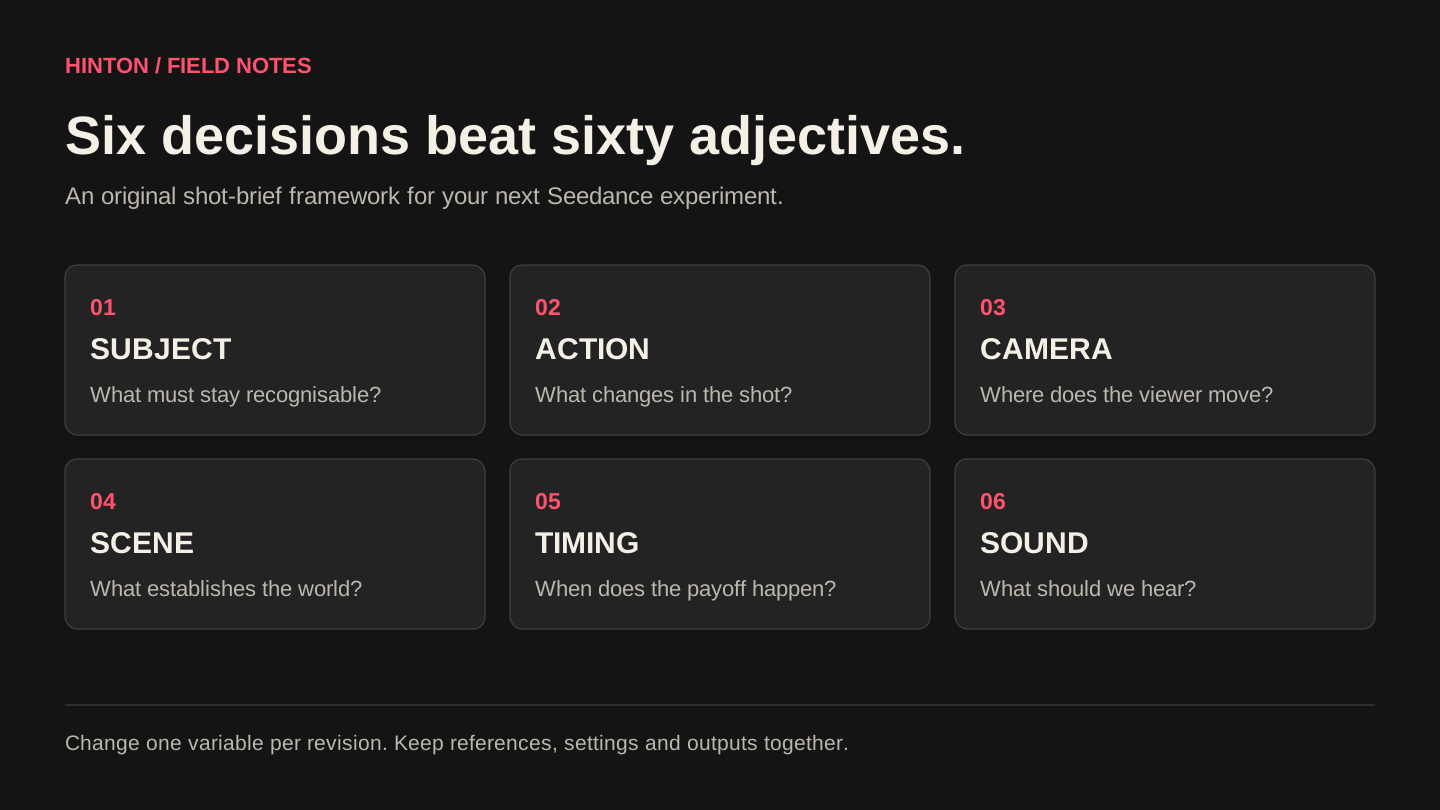
Step 2: give every reference a single responsibility
Prepare one approved product image and one mood reference. If camera motion matters, add a simple movement reference rather than another unrelated beauty image. Name their responsibilities in the prompt: product geometry, lighting palette, or camera direction.
Use the exact attachment labels your interface assigns. Do not paste example labels for files you have not uploaded. If two references disagree on product colour or shape, remove the conflict before generating. More references are not automatically more control.
- Product reference: shape, material, base and switch position.
- Mood reference: background colour, contrast and light quality.
- Motion reference, if needed: camera travel and reveal timing.
Step 3: write the first pass like a tiny shot list
The example below uses one camera move and one action. Its timing is a creative request; inspect whether the output follows it. Replace the bracketed attachment descriptions with the actual references in your chosen host.
Try this prompt · adapt to your project
Create a six-second, 16:9 product shot. Use [product image] for the exact lamp silhouette and [mood image] only for the warm lighting palette. A single desk lamp sits beside a closed notebook on a dark wooden desk. 0–2 seconds: medium close-up, lamp off, camera at desk height. 2–4 seconds: one hand enters from frame right and presses the switch once; a warm pool of light reveals the notebook. 4–6 seconds: the hand leaves; the camera completes a slow forward move and holds on the lamp. Keep the lamp, desk and notebook in the same positions. Quiet room tone and one switch click. No dialogue, music, captions or added logos.
Step 4: separate camera motion from subject motion
A dolly move changes the camera’s position. A zoom changes framing through the lens. A pan rotates the view. Asking for all three while a subject spins and the scene changes gives the model too many possible interpretations. Pick the movement that serves the reveal.
If the output invents a cut, explicitly request one continuous shot and simplify the action. If the subject drifts, describe a fixed position relative to a visible landmark. If the camera is too energetic, remove conflicting motion references before adding more words. When precision is essential, build the motion in Blender and use a reference-led approach.
Step 5: revise one variable and keep a record
Save the original prompt, settings, references and output. For the next attempt, change only the failing decision. “Keep the existing composition; make the switch action happen earlier” is a useful revision. “Make it more premium, faster, moodier and less artificial” changes too many things to diagnose.
Use a simple scorecard: product fidelity, action readability, temporal continuity, camera intent and sound. Give each a pass or fail, with one sentence explaining why. This is an editorial tool, not a scientific benchmark. Track accepted shots and total attempts so you can estimate actual production cost.
Step 6: know when prompting should stop
A distorted logo belongs in a controlled graphic layer. A mechanically exact product turn may belong in 3D. A line of legal copy belongs in typography you can edit. A voice or likeness needs appropriate permission. Generating repeatedly is not always the cheapest or most reliable correction.
Bring the selected clip into an edit. Check the first and last frames against adjacent shots; inspect hands, reflections and background motion at normal speed and frame by frame. Listen without looking at the picture. Deliver only after the film works as a sequence, with the correct framing, colour, sound and export settings.
Turn the exercise into an actual campaign
Once the basic shot works, develop a second opening that tests a different audience hook while keeping the product benefit constant. Keep the landing page and offer consistent if you want a useful comparison. A model cannot tell you whether an ad caused a qualified enquiry without campaign measurement.
Hinton can turn a product brief into a reference pack, directed shot sequence and platform-specific edits. Share your approved product assets, intended audience, channels and deadline. That is a much better starting point than a demand for “viral AI video”.
Research checked 27 September 2026. Product details can change. Workflow examples are editorial suggestions, not performance benchmarks or guaranteed results.